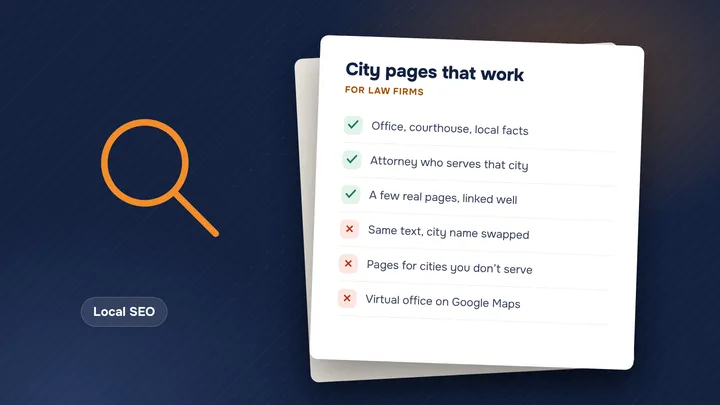
- Make one page for each type of case, not one page for everything.
- Answer what clients really ask: who it’s for, what happens, how long, what it costs.
- Skip copy-paste text and guarantee language, and have an attorney review every page.
One page for each type of case
A single “Practice Areas” page with six short paragraphs can’t do well for six different searches. Someone looking for a dog bite lawyer wants a page about dog bites. Give each case type you want more of its own page, with its own address and a clear title, like “Dog bite lawyer in Long Beach.”
Start with the cases that matter most to your firm: the ones that bring in the most fees, or the ones you want more of. A page for a case type you rarely take is not worth much.
Do this: list the case types you actually want, in order of value. That list is your page plan. It fits inside the wider set of 12 pages every law firm website needs.
What to put on the page
Google’s guide to helpful content asks whether a reader will “leave feeling they’ve learned enough about a topic” to reach their goal. On a practice-area page, the reader’s goal is to decide whether to call. Cover these:
- Who it’s for. Describe the reader’s situation in their words: “You were hurt in a crash that wasn’t your fault.”
- What happens. The steps from the first call to the end of the case, in order.
- Timelines. How long each stage usually takes in your experience, and any deadlines to act. Give honest ranges.
- Costs and fees. How you charge for this case type. If it is contingency, say who pays case costs.
- Local courts and agencies. Which courthouse or agency handles these cases where you practice.
- FAQs. Five to eight questions callers really ask, with short answers.
- A clear next step. A phone number people can tap and a short form, near the top and again at the end.
Do this: ask your intake staff for the ten questions they hear most about this case type, and answer them on the page.
Write what only your firm knows
Hundreds of firms have a car accident page, and most say the same things. Google asks whether content offers “original information, reporting, research, or analysis” and shows “first-hand expertise and a depth of knowledge.” For a law firm, that means details a hired writer can’t make up:
- What your intake team asks first, and why
- Common mistakes people make before they call a lawyer
- How cases like this usually move in your county, in your experience
- Who on your team handles these cases, linked to their attorney page
Google also suggests making it clear who created the content. Add the name of the attorney who reviewed the page, and the date.
Do this: spend 20 minutes with the attorney who handles these cases and write down what they tell every new client.
Sub-pages and internal links
Big practice areas need more than one page. A personal injury firm might have a main personal injury page with sub-pages for car accidents, truck accidents, slip and fall, and dog bites. An employment firm might split wrongful termination, harassment and unpaid wages.
Then link the pages so people and Google can follow the path. Google’s link guide says “every page you care about should have a link from at least one other page on your site,” and asks for link text that is “descriptive, reasonably concise, and relevant.”
- The main page links to each sub-page, and each sub-page links back up
- Related pages link to each other, like a car accident page to your FAQ about medical bills
- Link words say where they go, like “truck accident cases,” not “click here”
- Link to city pages only where they are real; see our guide to city pages
Do this: split a page when a sub-topic has enough real questions to fill its own page, not before.
Avoid thin and copy-paste pages
It is tempting to make one template and swap in the case type or the city. Google’s spam policies describe scaled content abuse as “when many pages are generated for the primary purpose of manipulating search rankings.” Examples include using AI tools “to generate many pages without adding value” and “stitching or combining content from different web pages without adding value.”
Plain duplicate text is a smaller problem, but still a problem. Google’s SEO starter guide says duplicate content is not a spam violation, but it can create “a bad user experience.”
Do this instead: write fewer pages, each with its own facts. If two pages would say nearly the same thing, merge them into one.
Stay within the rules, and have an attorney review it
California’s Rule 7.1 bans false or misleading communications about a lawyer’s services, and its comments say that promising or guaranteeing a result is misleading. Watch for:
- “We will win your case” or “guaranteed results”
- “No fee unless we win” without saying whether the client pays costs
- “Specialist,” unless the attorney is certified and the certifying body is named (Rule 7.4)
- Results or testimonials with no context or disclaimer
Honest wording works fine: “We will review your case for free and tell you what we think.”
Do this: have an attorney read every page before it goes live, and use our California advertising rules checklist. For hard questions, ask an ethics counsel. Our free website check shows which practice-area pages your site already has.
Want help with this? See SEO for law firms.
Sources
- Google Search Central: Creating helpful, reliable, people-first content
- Google Search Central: Link best practices for Google
- Google Search Central: Spam policies for Google web search
- Google Search Central: SEO Starter Guide
- State Bar of California: Rules of Professional Conduct, Chapter 7 (Rules 7.1–7.5)
Are your practice-area pages bringing in cases?
Check your website free in 30 seconds and get a plain list of what to fix.

Sevag is the founder of araRank and a web developer with 6 years in law firm marketing and SEO. He builds every site we make, from Los Angeles.
About Sevag →